Ga door naar hoofdinhoud
Word lid van de reparatiegemeenschap - Account aanmaken

How to Calibrate the Fingerprint Sensor in your Google Pixel Phone

    • If you're using a Windows operating system, download the Google USB driver and follow these instructions to install it.

    • If you're using a Linux operating system:

    • Run `sudo usermod -aG plugdev $LOGNAME`, then logout and log back in. This grants your user account permission to mount your phone and other removable devices.

    • Run `sudo apt update` followed by `sudo apt install android-sdk-platform-tools-common`. This will install USB drivers for your phone.

    • Refer to this guide for additional details.

    Vraag FixBot

    Voeg opmerking toe

  1. How to Calibrate the Fingerprint Sensor in your Google Pixel Phone, Connect your phone: stap 2, afbeelding 1 van 3 How to Calibrate the Fingerprint Sensor in your Google Pixel Phone, Connect your phone: stap 2, afbeelding 2 van 3 How to Calibrate the Fingerprint Sensor in your Google Pixel Phone, Connect your phone: stap 2, afbeelding 3 van 3
    • Follow these instructions to enable developer options and USB debugging mode.

    • Navigate to this page to prepare the calibration software.

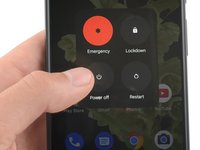
    • If your phone isn't turned off, do so now.

    • Hold down the power and volume down buttons on your phone for three seconds to enter Fastboot mode.

    • Your phone will show a red warning triangle with the caption "Fastboot mode."

    • Plug your phone into your computer.

    Vraag FixBot

    Voeg opmerking toe

  2. How to Calibrate the Fingerprint Sensor in your Google Pixel Phone, Perform the calibration: stap 3, afbeelding 1 van 3 How to Calibrate the Fingerprint Sensor in your Google Pixel Phone, Perform the calibration: stap 3, afbeelding 2 van 3 How to Calibrate the Fingerprint Sensor in your Google Pixel Phone, Perform the calibration: stap 3, afbeelding 3 van 3
    • Select the "Connect Device" button.

    • Choose your device from the pop-up menu.

    • Depending on your browser, your pop-up menu will look different.

    • If your device isn't showing up, select the "Troubleshooting tips" link near the bottom of the page to diagnose your issue.

    • Once your device connects, select the "Install software" button.

    Vraag FixBot

    Voeg opmerking toe

  3. How to Calibrate the Fingerprint Sensor in your Google Pixel Phone: stap 4, afbeelding 1 van 3 How to Calibrate the Fingerprint Sensor in your Google Pixel Phone: stap 4, afbeelding 2 van 3 How to Calibrate the Fingerprint Sensor in your Google Pixel Phone: stap 4, afbeelding 3 van 3
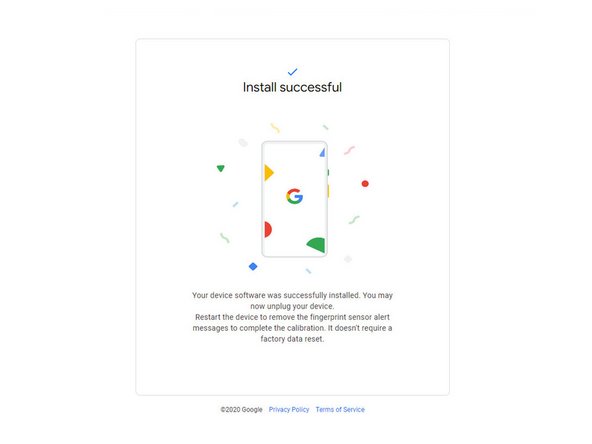
    • Wait for the calibration software to download and install.

    • The program will run automatically and restart your phone.

    • After you receive the "Install successful" prompt, unplug your phone and manually restart it again to complete the calibration.

    • If you don't manually restart your phone, your fingerprint sensor will not work properly.

    Vraag FixBot

    Voeg opmerking toe

Conclusie

Your fingerprint sensor is calibrated and ready for use.

If the calibration fails for any reason, repeat the calibration procedure.

Annuleren: ik heb deze handleiding niet afgemaakt.

351 andere personen hebben deze handleiding voltooid.

Alex Diaz-Kokaisl

Lid sinds: 01/16/22

244.748 Reputatie

1.203 handleidingen geschreven

Team

iFixit Lid van iFixit

Staff

123 Leden

28.230 handleidingen geschreven

130Gids Commentaar

When I try and use the calibration tool on my Pixel 6 I get an error message whilst downloading the software that says "Couldn't find the unique calibration software for this device". Any suggestions as to what is causing this?

Isheanesu Gambe - Antwoord Deel

Same problem. Pixel 7 android 14 latest update

Gleb - Antwoord Deel

Same problem. Pixel 6 android 14 latest update

Pavel Dolínek - Antwoord Deel

Same problem, pixel 7 android 14 January update

Sunggat Yerzhan - Antwoord Deel

same problem. Please help

Stalyn Moreno Briones - Antwoord Deel

Voeg opmerking toe

Weergavestatistieken:

Afgelopen 24 uren: 316

Afgelopen 7 dagen: 2,323

Afgelopen 30 dagen: 11,093

Altijd: 378,086