Ga door naar hoofdinhoud
Word lid van de reparatiegemeenschap - Account aanmaken

HKC P771A Camera Replacement

Wat je nodig hebt

  1. HKC P771A Camera Replacement, Camera: stap 1, afbeelding 1 van 3 HKC P771A Camera Replacement, Camera: stap 1, afbeelding 2 van 3 HKC P771A Camera Replacement, Camera: stap 1, afbeelding 3 van 3
    • Remove back of tablet using the plastic opening tool

    • Slide the opening tool between the back of the tablet and the digitizer

    • Lift along the edges until the back of the tablet and the digitizer are separated

  2. HKC P771A Camera Replacement: stap 2, afbeelding 1 van 2 HKC P771A Camera Replacement: stap 2, afbeelding 2 van 2
    • Remove yellow tape around the edges of the battery

    • The battery is located on the right side of the tablet when the screen is facing downwards and the camera is on top

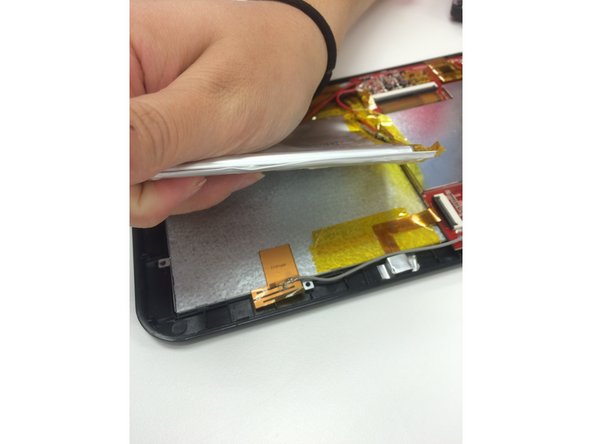
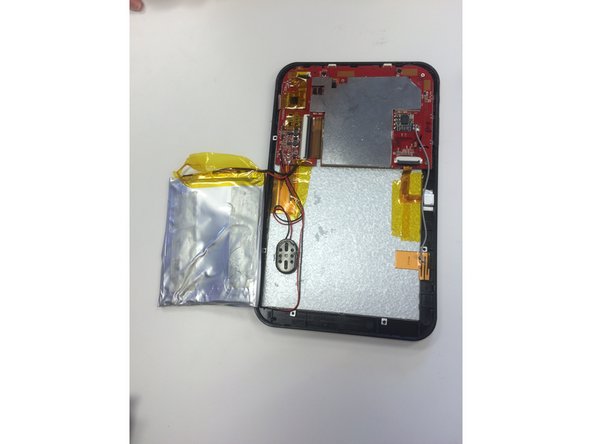
  3. HKC P771A Camera Replacement: stap 3, afbeelding 1 van 3 HKC P771A Camera Replacement: stap 3, afbeelding 2 van 3 HKC P771A Camera Replacement: stap 3, afbeelding 3 van 3
    • Pry battery away from the back of the tablet until the battery is completely separated from the adhesive

  4. HKC P771A Camera Replacement: stap 4, afbeelding 1 van 1
    • Remove yellow tape that is securing the camera wires

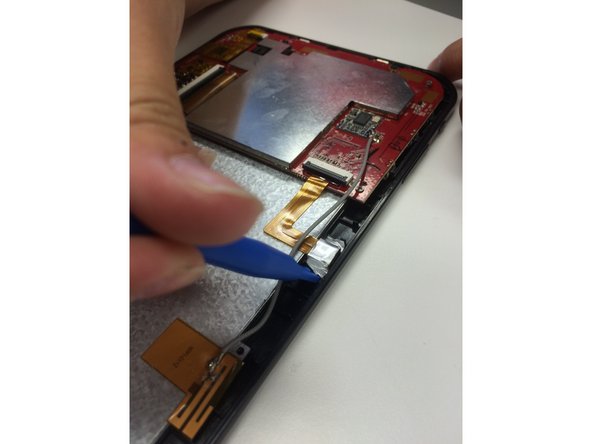
  5. HKC P771A Camera Replacement: stap 5, afbeelding 1 van 2 HKC P771A Camera Replacement: stap 5, afbeelding 2 van 2
    • Remove silver foil from the back of the camera using the blue opening tool

  6. HKC P771A Camera Replacement: stap 6, afbeelding 1 van 1
    • Lift the bronze, L-shaped ribbon

    • The camera is attached to the end of this ribbon so it will move with it

  7. HKC P771A Camera Replacement: stap 7, afbeelding 1 van 1
    • Flip up the black bar located on the motherboard

    • The black bar is to the left of the camera, where the ribbon is attached to the motherboard

  8. HKC P771A Camera Replacement: stap 8, afbeelding 1 van 1
    • Remove the bronze, L-shaped ribbon from inside the black bar

  9. HKC P771A Camera Replacement: stap 9, afbeelding 1 van 1
    • Your camera is now removed from the tablet

Conclusie

To reassemble your device, follow these instructions in reverse order.

Sara Hill

Lid sinds: 09/30/15

101 Reputatie

2 handleidingen geschreven

Team

Ohio State, Team 2-3, Garvin Fall 2015 Lid van Ohio State, Team 2-3, Garvin Fall 2015

OSU-GARVIN-F15S2G3

4 Leden

4 handleidingen geschreven

0Gids Commentaar

Voeg opmerking toe

Weergavestatistieken:

Afgelopen 24 uren: 0

Afgelopen 7 dagen: 0

Afgelopen 30 dagen: 2

Altijd: 226