Ga door naar hoofdinhoud
Word lid van de reparatiegemeenschap - Account aanmaken

GoPro Hero+ LCD Back Panel Disassembly

Alleen vereisten
Deze gids is alleen bedoeld voor beginners! Deze gids maakt deel uit van een andere procedure en is niet bedoeld om alleen te worden gebruikt.

Wat je nodig hebt

  1. GoPro Hero+ LCD Back Panel Disassembly, Back Panel: stap 1, afbeelding 1 van 2 GoPro Hero+ LCD Back Panel Disassembly, Back Panel: stap 1, afbeelding 2 van 2
    • Be sure to power off the GoPro before you start disassembly.

    • Pop up and pull back on the clip to remove the screen cover and expose the back panel with the touchscreen.

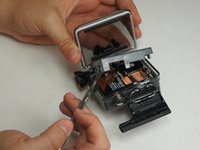
  2. GoPro Hero+ LCD Back Panel Disassembly: stap 2, afbeelding 1 van 2 GoPro Hero+ LCD Back Panel Disassembly: stap 2, afbeelding 2 van 2
    • Use the metal spudger to pry around the perimeter of the panel.

    • Pry the panel upwards by inserting the metal spudger into the corner crease between the panel and camera shell.

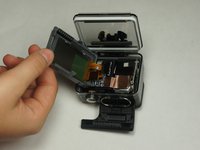
  3. GoPro Hero+ LCD Back Panel Disassembly: stap 3, afbeelding 1 van 2 GoPro Hero+ LCD Back Panel Disassembly: stap 3, afbeelding 2 van 2
    • Pry around the panel to ensure it is not attached to the device.

    • Move the panel to the side so you can access the internal components.

    • The panel is still attached to the rest of the device with a ribbon cable, so be sure to not tear or damage the cable.

Conclusie

To reassemble your device, follow these instructions in reverse order.

Matthew Tinkey

Lid sinds: 08/27/15

922 Reputatie

4 handleidingen geschreven

Team

USF Tampa, Team 2-4, Blackwell Fall 2015 Lid van USF Tampa, Team 2-4, Blackwell Fall 2015

USFT-BLACKWELL-F15S2G4

4 Leden

20 handleidingen geschreven

0Gids Commentaar

Voeg opmerking toe

Weergavestatistieken:

Afgelopen 24 uren: 0

Afgelopen 7 dagen: 1

Afgelopen 30 dagen: 3

Altijd: 178