Ga door naar hoofdinhoud

Fan and SSD Cover Removal

Alleen vereisten
Deze gids is alleen bedoeld voor beginners! Deze gids maakt deel uit van een andere procedure en is niet bedoeld om alleen te worden gebruikt.
  1. Fan and SSD Cover Removal, Before you begin: stap 1, afbeelding 1 van 3 Fan and SSD Cover Removal, Before you begin: stap 1, afbeelding 2 van 3 Fan and SSD Cover Removal, Before you begin: stap 1, afbeelding 3 van 3
    • Before starting your repair:

    • Shut down your PlayStation and unplug all cables and accessories.

    • Remove any stands supporting your console and lay it down so the right side is facing up.

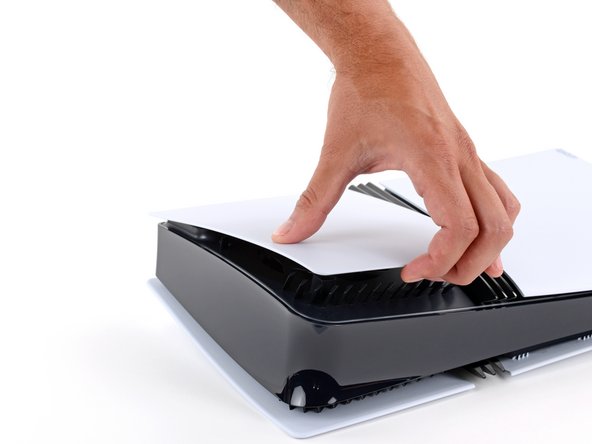
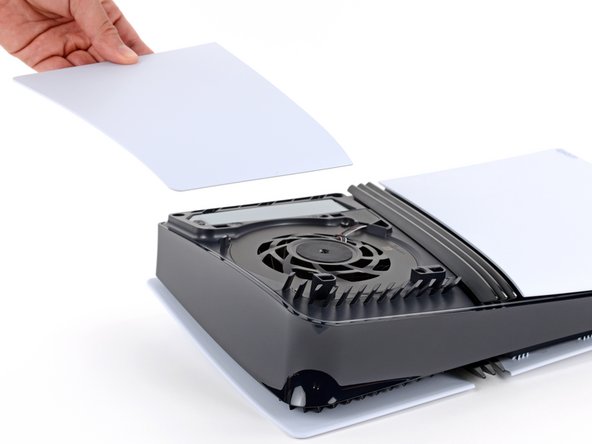
  2. Fan and SSD Cover Removal, Remove the fan and SSD cover: stap 2, afbeelding 1 van 3 Fan and SSD Cover Removal, Remove the fan and SSD cover: stap 2, afbeelding 2 van 3 Fan and SSD Cover Removal, Remove the fan and SSD cover: stap 2, afbeelding 3 van 3
    • The cover is secured with hooks along the back edge and clips along the front edge.

    • Firmly pull up the front edge of the smaller, upper cover to release the clips.

    • You'll hear distinct "pops" as the clips disengage.

    • Remove the cover.

    • To reinstall the cover, place the hooks into their cutouts along the rear edge and firmly press the front edge of the cover into place to re‑engage the two clips.

Eindstreep

Spencer Day

Lid sinds: 09/14/22

155.120 Reputatie

1.033 handleidingen geschreven

Team

iFixit Lid van iFixit

Staff

123 Leden

23.788 handleidingen geschreven

0Gids Commentaar

Voeg opmerking toe

Weergavestatistieken:

Afgelopen 24 uren: 0

Afgelopen 7 dagen: 0

Afgelopen 30 dagen: 0

Altijd: 46