Ga door naar hoofdinhoud

Ematic FunTab 3 Touch Screen Replacement

Wat je nodig hebt

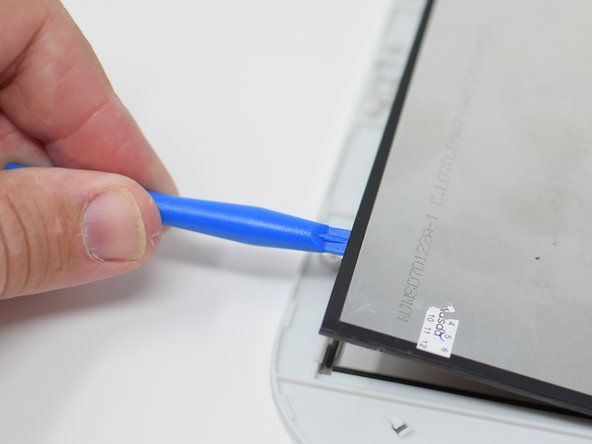
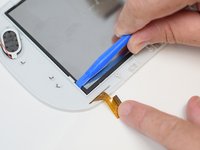
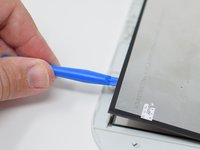
  1. Ematic FunTab 3 Touch Screen Replacement, Back Panel: stap 1, afbeelding 1 van 3 Ematic FunTab 3 Touch Screen Replacement, Back Panel: stap 1, afbeelding 2 van 3 Ematic FunTab 3 Touch Screen Replacement, Back Panel: stap 1, afbeelding 3 van 3
    • Turn off the device before starting

    • To prevent damage, open the device on the side without the buttons.

    • Insert the hooked end of the plastic opening tool in the gap between the screen and the back panel on the edge of the device.

    • Slide the plastic opening tool down the long side of the device.

    • Insert tool again and slide it down the long slide of the case a second time.

  2. Ematic FunTab 3 Touch Screen Replacement: stap 2, afbeelding 1 van 1
    • Pull the back panel away from the screen.

  3. Ematic FunTab 3 Touch Screen Replacement, Motherboard: stap 3, afbeelding 1 van 1
    • Remove the black tape to reveal the screen connector.

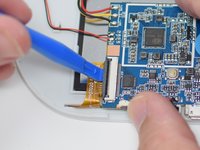
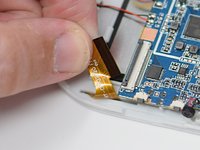
  4. Ematic FunTab 3 Touch Screen Replacement: stap 4, afbeelding 1 van 2 Ematic FunTab 3 Touch Screen Replacement: stap 4, afbeelding 2 van 2
    • Flip up the retaining tab using the plastic opening tool.

    • Pull out the screen wire ribbon to disconnect the screen and motherboard.

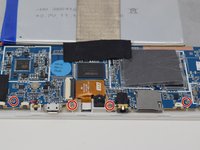
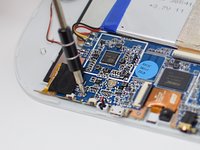
  5. Ematic FunTab 3 Touch Screen Replacement: stap 5, afbeelding 1 van 2 Ematic FunTab 3 Touch Screen Replacement: stap 5, afbeelding 2 van 2
    • Using a PH 00 screwdriver, remove the four 4.5 mm screws that are holding the motherboard in place.

  6. Ematic FunTab 3 Touch Screen Replacement: stap 6, afbeelding 1 van 1
    • It is now safe to remove and replace the old motherboard with your new motherboard.

    • Close the black ribbon retaining tabs once ribbons are inserted during reassembly.

  7. Ematic FunTab 3 Touch Screen Replacement, Touch Screen: stap 7, afbeelding 1 van 2 Ematic FunTab 3 Touch Screen Replacement, Touch Screen: stap 7, afbeelding 2 van 2
    • Insert the hook side of the opening tool between the case and display.

    • Press down on the tool until the screen is clear of the white retaining tabs.

    • Use the plastic opening tool to gently pry up the screen.

    • This is best done on the corner closest to the wire ribbon.

    • Continue prying around the screen until the screen pops out.

  8. Ematic FunTab 3 Touch Screen Replacement: stap 8, afbeelding 1 van 1
    • After the screen has come lose, remove it from the device.

    • When reassembling, make sure the screen locks in place, this may require extra pressure

    • Close the black ribbon retaining tabs once ribbons are inserted during reassembly.

Conclusie

To reassemble your device, follow these instructions in reverse order.

Amanda Davis

Lid sinds: 07/11/18

581 Reputatie

5 handleidingen geschreven

Team

UW Tacoma, Team S1-G5, Cardinal Summer 2018 Lid van UW Tacoma, Team S1-G5, Cardinal Summer 2018

UWT-CARDINAL-SU18S1G5

4 Leden

12 handleidingen geschreven

1Gids Commentaar

Where can I get a new display for my emoticons funtab 3?

DanTheMan RBLX - Antwoord

Voeg opmerking toe

Weergavestatistieken:

Afgelopen 24 uren: 0

Afgelopen 7 dagen: 4

Afgelopen 30 dagen: 8

Altijd: 1,023