Dit is een machinevertaling, die nog niet door iemand is nagekeken. Spreek je deze taal? Controleer het hier.

DualShock 2 uit elkaar halen

Peder Hertel en
Voor het laatst geüpdatet op 29 jul 2026
Bekeken: 91K
Statistieken weergeven:
- Afgelopen 24 uur:
- 14
- Afgelopen 7 dagen:
- 156
- Afgelopen 30 dagen:
- 873
- Altijd:
- 90.596
Commentaar: 13
6 opmerkingen over de stappen, 7 opmerkingen op de handleiding.
Bekijk de opmerkingen bij de handleidingVoltooid: 48 49
48 mensen hebben deze handleiding als "voltooid" gemarkeerd. Ben jij de volgende?
49 personen hebben deze handleiding als "voltooid" gemarkeerd. Een daarvan ben jij—lekker bezig!
Favorieten: 15 16
15 mensen hebben deze handleiding als favoriet gemarkeerd en volgen deze. Ben jij de volgende?
16 personen hebben deze handleiding als favoriet gemarkeerd (en blijven daarmee op de hoogte van meldingen)—een daarvan ben jij!
Betere introductie
Verbeter deze handleiding door het afmaken of herzien van de introductie.
Wat je nodig hebt
Gereedschap

-
-
-
Controleer eerst of de aansluitpoort van je controller (draadloos of niet) nog alle pinnen heeft.
-
Als je een bedrade controller hebt (een controller met een kabel die direct op je console wordt aangesloten), probeer deze dan in verschillende richtingen te buigen. Dit kan de verbinding in de bedrading van de controller herstellen en mogelijk voor een tijdelijke oplossing zorgen.
 Vraag FixBot
-
-
-
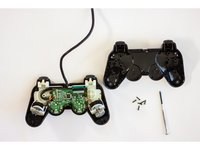
Draai de controller om en verwijder alle 6 schroeven van de onderkant van de controller.
-
-
-
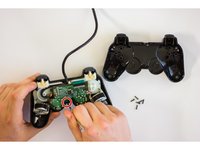
Zodra de schroeven zijn verwijderd, wrikt u de controller voorzichtig met uw handen open.
-
Verwijder de schroef die de printplaat op zijn plek houdt.
-
-
-
-
Controleer de rubberen kussentjes op vuil dat de zwarte kussentjes in de weg zou kunnen zitten. Deze zorgen voor een elektrische verbinding op het kussentje en maken mogelijk geen goed contact.
-
-
-
Controleer de flexibele triggerprintplaat zelf op vuil of stof dat de rubberen knoppenmat in de weg kan zitten.
-
-
-
Controleer de verbinding van de flexibele trigger-printplaat met de hoofd-printplaat van je controller.
-
-
-
Als de voorgaande stappen allemaal zijn doorlopen en je nog steeds problemen ondervindt bij het werkend krijgen van de knoppen, overweeg dan om de hoofd-printplaat of de flexibele trigger-printplaat te vervangen.
-
-
-
Volg de stappen voor het demonteren in omgekeerde volgorde totdat de controller weer in zijn oorspronkelijke staat is. Sluit de controller aan op de console en test of de reparatie heeft gewerkt.
-
-




Annuleren: ik heb deze handleiding niet afgemaakt.
48 andere personen hebben deze handleiding voltooid.

Team

Cal Poly, Team 17-5, Green Fall 2015 Lid van Cal Poly, Team 17-5, Green Fall 2015
CPSU-GREEN-F15S17G5
4 Leden
36 handleidingen geschreven
7 opmerkingen onder de handleiding
Dualshock 2 controllers, model A and H, are having 8 pins, not 9. Your first Step is false and rarely wires are the cause of the problem.
No my Dual-shock 2 controller has 9 pins so you are wrong he is right man.
Eva Langley is correct, some of these controllers have only 8 pins, not 9. I myself can conformed this because I just recently opened one of two brand new fresh out of the box Sony original equipment controllers that I purchased (for a little less than $10 a piece) during a clearance sale at my local Sears just before they went out of business. So Eva is NOT wrong. I still have the second one still in the box and before anyone ask, I don’t won’t to sale. I purchased them because I have had both my original controllers go out after they were sitting up for a few years without use. My game units are very well taken care of but the controllers of the PS2 just stopped working and finding a definitive answer to why this happens is STILL very elusive in 2019.
