Ga door naar hoofdinhoud
Word lid van de reparatiegemeenschap - Account aanmaken

Dell Precision 7560 Fan Replacement

Wat je nodig hebt

  1. Dell Precision 7560 Fan Replacement, Fan: stap 1, afbeelding 1 van 2 Dell Precision 7560 Fan Replacement, Fan: stap 1, afbeelding 2 van 2
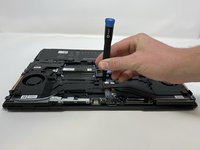
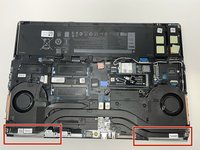
    • The screws holding the fan in place cannot be fully removed.

    • Loosen the eight captive screws that secure the fan assembly.

    • Each screw is numbered in the order that they should be loosened.

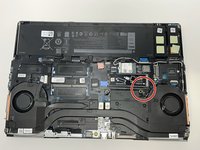
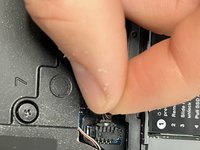
  2. Dell Precision 7560 Fan Replacement: stap 2, afbeelding 1 van 2 Dell Precision 7560 Fan Replacement: stap 2, afbeelding 2 van 2
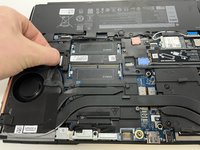
    • Locate connector cable and pull lightly to remove.

  3. Dell Precision 7560 Fan Replacement: stap 3, afbeelding 1 van 2 Dell Precision 7560 Fan Replacement: stap 3, afbeelding 2 van 2
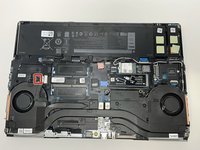
    • Gently pull the first fan connector from the head until it is removed.

    • The thin wire is prone to damage. Exercise extra caution during removal.

  4. Dell Precision 7560 Fan Replacement: stap 4, afbeelding 1 van 2 Dell Precision 7560 Fan Replacement: stap 4, afbeelding 2 van 2
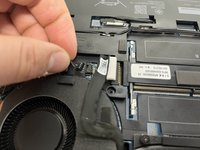
    • Gently pull the second fan connector from the head until it is removed.

    • The thin wire is prone to damage. Exercise extra caution during removal.

  5. Dell Precision 7560 Fan Replacement: stap 5, afbeelding 1 van 2 Dell Precision 7560 Fan Replacement: stap 5, afbeelding 2 van 2
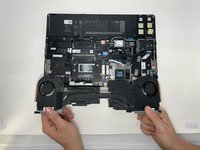
    • Lifting from the bottom, carefully remove the laptop's fans.

Conclusie

To reassemble your device, follow these instructions in reverse order.

Één andere persoon heeft deze handleiding voltooid.

Jack Allred

Lid sinds: 02/09/23

351 Reputatie

2 handleidingen geschreven

Team

0Gids Commentaar

Voeg opmerking toe

Weergavestatistieken:

Afgelopen 24 uren: 2

Afgelopen 7 dagen: 27

Afgelopen 30 dagen: 114

Altijd: 2,797