Ga door naar hoofdinhoud

Dell Inspiron M5110 Module Cover Replacement

Alleen vereisten
Deze gids is alleen bedoeld voor beginners! Deze gids maakt deel uit van een andere procedure en is niet bedoeld om alleen te worden gebruikt.

Wat je nodig hebt

  1. Dell Inspiron M5110 Module Cover  Replacement, Battery: stap 1, afbeelding 1 van 1
    • Shut down the computer and turn it upside down.

  2. Dell Inspiron M5110 Module Cover  Replacement: stap 2, afbeelding 1 van 1
    • Slide both of the battery release latches on the bottom of the device in towards the center of the computer.

  3. Dell Inspiron M5110 Module Cover  Replacement: stap 3, afbeelding 1 van 1
    • Slide and lift the battery up and out from the device.

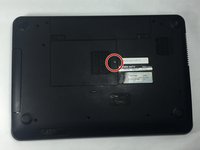
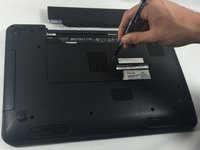
  4. Dell Inspiron M5110 Module Cover  Replacement, Module Cover: stap 4, afbeelding 1 van 2 Dell Inspiron M5110 Module Cover  Replacement, Module Cover: stap 4, afbeelding 2 van 2
    • Remove the 5 mm Phillips # 0 screw in the middle of the device.

  5. Dell Inspiron M5110 Module Cover  Replacement: stap 5, afbeelding 1 van 1
    • Remove the module cover pressing in the release tabs and pulling the cover up and away from the base of the device.

Conclusie

To reassemble your device, follow these instructions in reverse order.

Cody Flynn

Lid sinds: 10/18/16

334 Reputatie

4 handleidingen geschreven

Team

UMass Dartmouth, Team 4-3, Catania Fall 2016 Lid van UMass Dartmouth, Team 4-3, Catania Fall 2016

UMASSD-CATANIA-F16S4G3

3 Leden

8 handleidingen geschreven

0Gids Commentaar

Voeg opmerking toe

Weergavestatistieken:

Afgelopen 24 uren: 0

Afgelopen 7 dagen: 0

Afgelopen 30 dagen: 1

Altijd: 70