Ga door naar hoofdinhoud
Word lid van de reparatiegemeenschap - Account aanmaken

Casio Exilim EX-Z850 Motherboard Replacement

Wat je nodig hebt

  1. Casio Exilim EX-Z850 Motherboard Replacement, Motherboard: stap 1, afbeelding 1 van 1
    • Using the Phillips #00 screwdriver, remove the four screws from the side of the speaker.

    Vraag FixBot

    Voeg opmerking toe

  2. Casio Exilim EX-Z850 Motherboard Replacement: stap 2, afbeelding 1 van 1
    • Using the Phillips #00 screwdriver, remove the four long screws from the bottom of the camera.

    • When reassembling the camera, the longer screws go on the bottom of the camera.

    Vraag FixBot

    Voeg opmerking toe

  3. Casio Exilim EX-Z850 Motherboard Replacement: stap 3, afbeelding 1 van 1
    • Using the Phillips #00 screwdriver, remove the four screws from the side opposite of the speaker.

    Vraag FixBot

    Voeg opmerking toe

  4. Casio Exilim EX-Z850 Motherboard Replacement: stap 4, afbeelding 1 van 3 Casio Exilim EX-Z850 Motherboard Replacement: stap 4, afbeelding 2 van 3 Casio Exilim EX-Z850 Motherboard Replacement: stap 4, afbeelding 3 van 3
    Gereedschap gebruikt in deze stap:
    Tweezers
    $4.99
    • Pry open bottom casing gently after all screws have been removed.

    • With tweezers, carefully remove the ribbon from the LCD screen.

    • Set the bottom casing aside.

    Vraag FixBot

    Voeg opmerking toe

  5. Casio Exilim EX-Z850 Motherboard Replacement: stap 5, afbeelding 1 van 3 Casio Exilim EX-Z850 Motherboard Replacement: stap 5, afbeelding 2 van 3 Casio Exilim EX-Z850 Motherboard Replacement: stap 5, afbeelding 3 van 3
    • Pry apart the top casing using tweezers.

    • Set the top casing aside.

    • The bottom left screw on the board is orange and the longest screw.

    Vraag FixBot

    Voeg opmerking toe

  6. Casio Exilim EX-Z850 Motherboard Replacement: stap 6, afbeelding 1 van 2 Casio Exilim EX-Z850 Motherboard Replacement: stap 6, afbeelding 2 van 2
    • Carefully remove the pieces of black tape on the bottom of the LCD screen that attach it to the frame.

    • Use tweezers to pry the LCD screen off from the opening.

    Vraag FixBot

    Voeg opmerking toe

  7. Casio Exilim EX-Z850 Motherboard Replacement: stap 7, afbeelding 1 van 2 Casio Exilim EX-Z850 Motherboard Replacement: stap 7, afbeelding 2 van 2
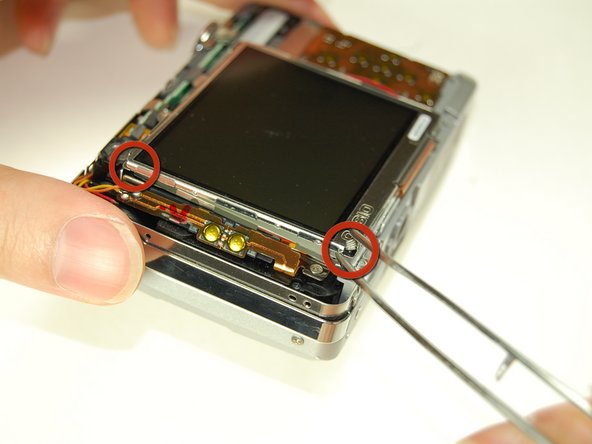
    • Lift the LCD screen and move it to the other side.

    Vraag FixBot

    Voeg opmerking toe

  8. Casio Exilim EX-Z850 Motherboard Replacement: stap 8, afbeelding 1 van 2 Casio Exilim EX-Z850 Motherboard Replacement: stap 8, afbeelding 2 van 2
    • Using a pair of tweezers, pry off the LCD casing.

    Vraag FixBot

    Voeg opmerking toe

  9. Casio Exilim EX-Z850 Motherboard Replacement: stap 9, afbeelding 1 van 3 Casio Exilim EX-Z850 Motherboard Replacement: stap 9, afbeelding 2 van 3 Casio Exilim EX-Z850 Motherboard Replacement: stap 9, afbeelding 3 van 3
    • Flip open the connector holding the ribbon.

    • Use the tweezers to carefully pull out the LCD screen with the ribbon from the camera.

    Vraag FixBot

    Voeg opmerking toe

  10. Casio Exilim EX-Z850 Motherboard Replacement: stap 10, afbeelding 1 van 2 Casio Exilim EX-Z850 Motherboard Replacement: stap 10, afbeelding 2 van 2
    • Using the Phillips #00 screwdriver, remove two screws on the side where the battery is located.

    • Remove the lanyard loop after the screws come off.

    • Pull the side casing so it becomes dislocated from the top of the camera frame.

    Vraag FixBot

    Voeg opmerking toe

  11. Casio Exilim EX-Z850 Motherboard Replacement: stap 11, afbeelding 1 van 2 Casio Exilim EX-Z850 Motherboard Replacement: stap 11, afbeelding 2 van 2
    • On the front of the camera near the flash, flip the connector holding the ribbon.

    • Remove the ribbon from the connector.

    Vraag FixBot

    Voeg opmerking toe

  12. Casio Exilim EX-Z850 Motherboard Replacement: stap 12, afbeelding 1 van 3 Casio Exilim EX-Z850 Motherboard Replacement: stap 12, afbeelding 2 van 3 Casio Exilim EX-Z850 Motherboard Replacement: stap 12, afbeelding 3 van 3
    • Carefully remove the L-shaped frame from the camera.

    • The L shaped frame is being held in by two plastic bumps and a metal tab at the bottom of the camera.

    • Pop the frame off the bumps and tabs.

    • Potential for device damage: Be careful not to pull off the yellow and orange wire soldered onto the camera.

    Vraag FixBot

    Voeg opmerking toe

  13. Casio Exilim EX-Z850 Motherboard Replacement: stap 13, afbeelding 1 van 2 Casio Exilim EX-Z850 Motherboard Replacement: stap 13, afbeelding 2 van 2
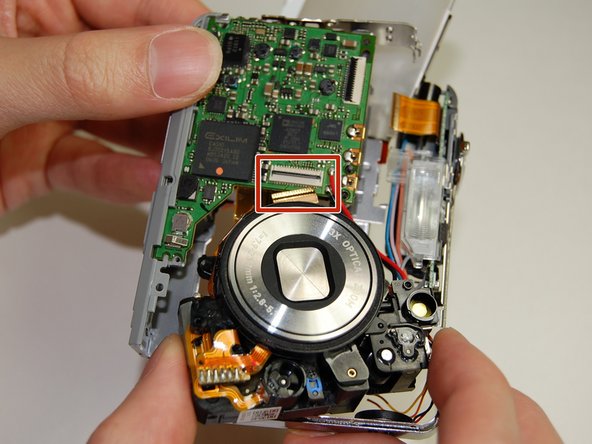
    • Flip the connector and remove the ribbon cable from the motherboard next to the lens.

    Vraag FixBot

    Voeg opmerking toe

  14. Casio Exilim EX-Z850 Motherboard Replacement: stap 14, afbeelding 1 van 2 Casio Exilim EX-Z850 Motherboard Replacement: stap 14, afbeelding 2 van 2
    • Remove the frame on the back side of the camera where the LCD screen was.

    • Use the Phillips #00 screwdriver to remove the two screws connecting the frame to the camera.

    • Slowly pry off the frame from the camera.

    • After removing the frame, a plastic piece with two yellow buttons should fall off.

    • Do not pull the plastic piece off as it is soldered to two wires: a yellow and orange one.

    Vraag FixBot

    Voeg opmerking toe

  15. Casio Exilim EX-Z850 Motherboard Replacement: stap 15, afbeelding 1 van 1
    • On the back of the camera where the LCD screen was, remove the 3 screws located behind the lens using the Phillips #00 screwdriver.

    Vraag FixBot

    Voeg opmerking toe

  16. Casio Exilim EX-Z850 Motherboard Replacement: stap 16, afbeelding 1 van 1
    • Remove the large orange ribbon previously held in by screws from the camera.

    Vraag FixBot

    Voeg opmerking toe

  17. Casio Exilim EX-Z850 Motherboard Replacement: stap 17, afbeelding 1 van 1
    • On the backside of the camera where the indicator lamp is located, remove the two screws using the Phillips #00 screwdriver.

    Vraag FixBot

    Voeg opmerking toe

  18. Casio Exilim EX-Z850 Motherboard Replacement: stap 18, afbeelding 1 van 3 Casio Exilim EX-Z850 Motherboard Replacement: stap 18, afbeelding 2 van 3 Casio Exilim EX-Z850 Motherboard Replacement: stap 18, afbeelding 3 van 3
    • On the front side of the indicator lamp remove the screw using the Phillips #00 screwdriver.

    Vraag FixBot

    Voeg opmerking toe

  19. Casio Exilim EX-Z850 Motherboard Replacement: stap 19, afbeelding 1 van 2 Casio Exilim EX-Z850 Motherboard Replacement: stap 19, afbeelding 2 van 2
    • Desolder the lens from the motherboard.

    • Desolder the wire from the motherboard.

    • The motherboard is now detached from the rest of the camera.

    Vraag FixBot

    Voeg opmerking toe

Conclusie

To reassemble your device, follow these instructions in reverse order.

Annuleren: ik heb deze handleiding niet afgemaakt.

Één andere persoon heeft deze handleiding voltooid.

Jennifer Roth

Lid sinds: 01/28/11

162 Reputatie

1 Handleiding geschreven

Team

Cal Poly, Team 4-38, Regan Winter 2011 Lid van Cal Poly, Team 4-38, Regan Winter 2011

CPSU-REGAN-W11S4G38

4 Leden

14 handleidingen geschreven

0Gids Commentaar

Voeg opmerking toe

Weergavestatistieken:

Afgelopen 24 uren: 6

Afgelopen 7 dagen: 14

Afgelopen 30 dagen: 79

Altijd: 4,414