Inleiding
This guide will show you how to properly locate and replace the front camera on your Azpen 1045 tablet. If your camera is blurry, cracked, or not working, follow these simple steps to safely remove and install a new one. No advanced tools or skills are needed just patience and care.
Wat je nodig hebt
-
-
Power off the tablet by holding the side button for five seconds.
-
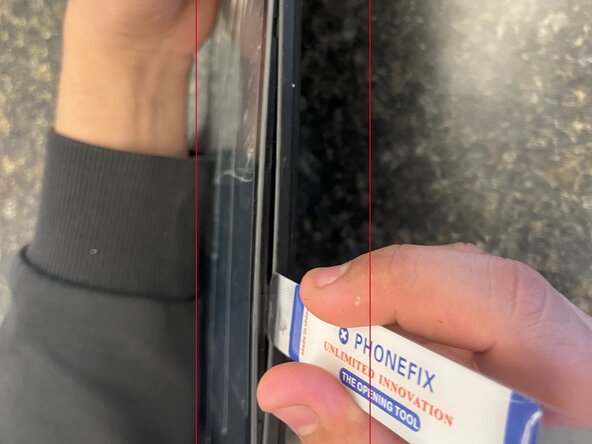
Insert an opening tool into one of the sides and lift until the screen comes off.
-
-
-
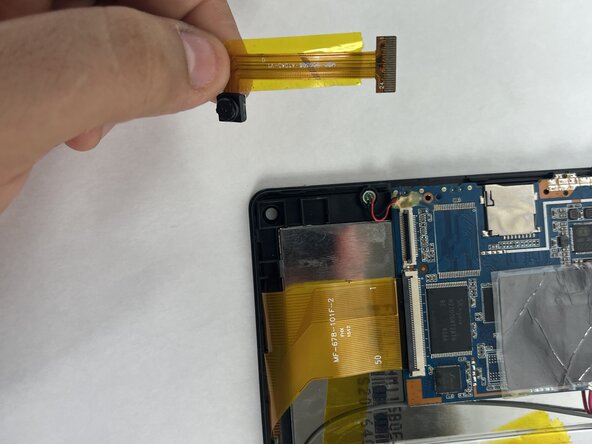
Start by locating the camera, which is directly above the battery if you are holding the tablet front side up.
-
-



To reassemble your device, follow these instructions in reverse order.
Annuleren: ik heb deze handleiding niet afgemaakt.
Één andere persoon heeft deze handleiding voltooid.



Team

UMass Dartmouth, Team 5-1, Biswokarma Spring 2025 Lid van UMass Dartmouth, Team 5-1, Biswokarma Spring 2025
UMASSD-BISWOKARMA-S25S5G1
7 Leden
4 handleidingen geschreven
