Dit is een machinevertaling, die nog niet door iemand is nagekeken. Spreek je deze taal? Controleer het hier.

Asus ZenBook UX303U Schermassemblage vervangen

Voor het laatst geüpdatet op 6 aug 2026
Bekeken: 9,6K
Statistieken weergeven:
- Afgelopen 24 uur:
- 3
- Afgelopen 7 dagen:
- 22
- Afgelopen 30 dagen:
- 100
- Altijd:
- 9.581
Commentaar: 17
10 opmerkingen over de stappen, 7 opmerkingen op de handleiding.
Bekijk de opmerkingen bij de handleidingVoltooid: 8 9
8 mensen hebben deze handleiding als "voltooid" gemarkeerd. Ben jij de volgende?
9 personen hebben deze handleiding als "voltooid" gemarkeerd. Een daarvan ben jij—lekker bezig!
Favorieten: 0 1
Niemand heeft deze handleiding gemarkeerd als favoriet of volgt de handleiding. Ben jij de eerste?
1 persoon heeft deze handleiding als favoriet gemarkeerd (en blijft daarmee op de hoogte van meldingen)—dat ben jij!
Inleiding
Ga naar stap 1 ↓Deze handleiding laat zien hoe je het scherm van een Asus ZenBook UX303U-laptop vervangt.
Wat je nodig hebt
Gereedschap


-
-
-
Verwijder de twee ronde, rubberen voeten aan de scharnierkant van de laptop.
 Vraag FixBot
-
-
-
Verwijder de elf 4 mm lange Phillips #00 schroeven uit het achterste paneel.
-
-
-
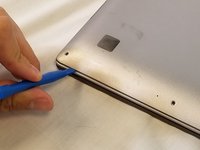
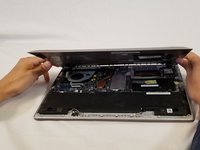
Wrik het achterste paneel los van de laptop met behulp van een plastic openingstool.
-
-
-
-
-
-
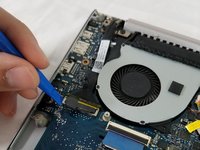
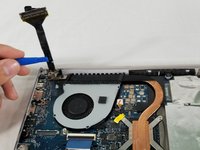
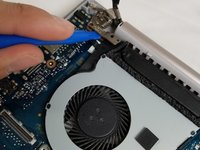
Verwijder de kabel die de schermmodule met het moederbord verbindt.
-
-
-
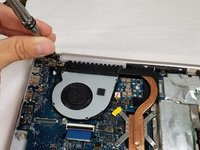
Verwijder de drie 4 mm Phillips #00-schroeven in het scharnier om de moederbordventilator los te maken.
-
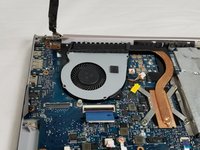
Til het scharnier omhoog.
-
-
-
Verwijder de drie Phillips #00-kruiskopschroeven waarmee het scharnier aan het I/O-bord is bevestigd.
-
-
-
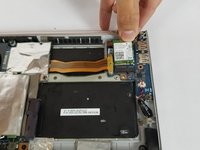
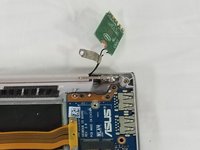
Verwijder de wifi-kaart door deze recht uit de (kabel)aansluiting te trekken.
-
-
-
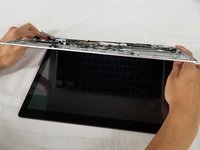
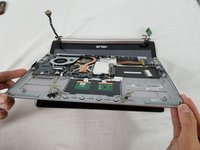
Til het volledige onderste samenstel omhoog en van de scharnieren af die het op zijn plek houden.
-
-










Volg deze instructies in omgekeerde volgorde om je apparaat weer in elkaar te zetten.
Annuleren: ik heb deze handleiding niet afgemaakt.
8 andere personen hebben deze handleiding voltooid.

Team

USF Tampa, Team S3-G5, Nance Spring 2018 Lid van USF Tampa, Team S3-G5, Nance Spring 2018
USFT-NANCE-S18S3G5
3 Leden
60 handleidingen geschreven
7 opmerkingen onder de handleiding
If anyone knows of a good, reliable source to buy a replacement screen assembly let me know, please. I have a 303U with the 1800 screen and I accidentally sat something heavy enough on top of the laptop to crack the screen on the right-third of the screen. I can’t use half of the touch screen and it’s fairly obvious depending on the color/brightness of the content I’m looking at. Would like to be able to replace this and these steps are pretty easy for me to follow so I’m confident I can have a newish looking laptop again if I can find a replacement screen.
Hi ! Did you manage to find one? I’m trying to do the same thing :)
The bottom of the pictured device may feature Phillips #00 screws, but I also have this laptop and the screws around the edge of the bottom panel are Torx T5s on my device.
Same here, asus ux303u screen side hinge is stuffed. But I think it may actually be the plastic screen cover itself where the hinge attaches, not just the hinge.
