Inleiding
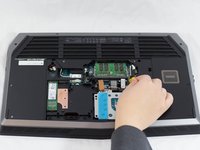
This guide will show you how to replace the RAM for your Alienware 17 R3 laptop. Ensure you have all the necessary tools before starting.
Wat je nodig hebt
-
-
-
Unplug the black wire with the yellow tag to disconnect the battery from the RAM stick.
-
-
-
Release the tabs on each side of the chip by simultaneously pushing each tab away from the RAM.
-
After the RAM chip has popped up, pull it straight out of its socket.
-

 Vraag FixBot



To reassemble your device, follow these instructions in reverse order.
Annuleren: ik heb deze handleiding niet afgemaakt.
6 andere personen hebben deze handleiding voltooid.

Team

UW Tacoma, Team 1-1, Rose Winter 2017 Lid van UW Tacoma, Team 1-1, Rose Winter 2017
UWT-ROSE-W17S1G1
3 Leden
6 handleidingen geschreven
