Ga door naar hoofdinhoud
Word lid van de reparatiegemeenschap - Account aanmaken

360fly 4K Lens Replacement

Wat je nodig hebt

  1. 360fly 4K Lens Replacement, Battery: stap 1, afbeelding 1 van 1
    • Flip the camera upside down and peel off the two plastic screw covers with the metal spudger to reveal the screws.

    Vraag FixBot
  2. 360fly 4K Lens Replacement: stap 2, afbeelding 1 van 1
    • Remove the two 5 mm screws from the bottom of the camera with a T4 screwdriver.

    Vraag FixBot
  3. 360fly 4K Lens Replacement: stap 3, afbeelding 1 van 2 360fly 4K Lens Replacement: stap 3, afbeelding 2 van 2
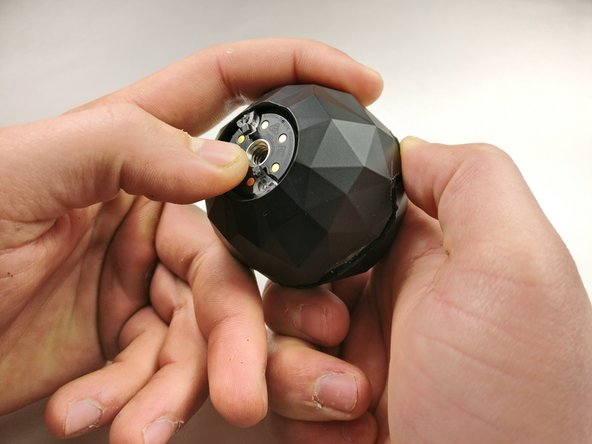
    • Gently pry the plastic ring from around the charging plate with the metal spudger.

    • Remove the outside shell by pressing against the center of the charging plate and pulling the bottom shell away from the top shell.

    Vraag FixBot
  4. 360fly 4K Lens Replacement: stap 4, afbeelding 1 van 1
    • Remove the five 2 mm screws using a T4 screwdriver.

    • Pull off the charging plate assembly.

    Vraag FixBot
  5. 360fly 4K Lens Replacement: stap 5, afbeelding 1 van 2 360fly 4K Lens Replacement: stap 5, afbeelding 2 van 2
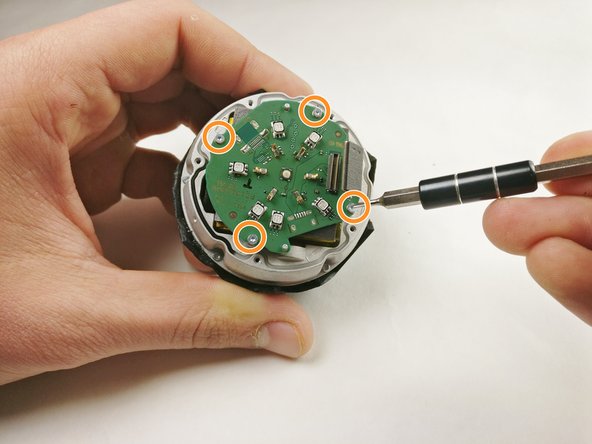
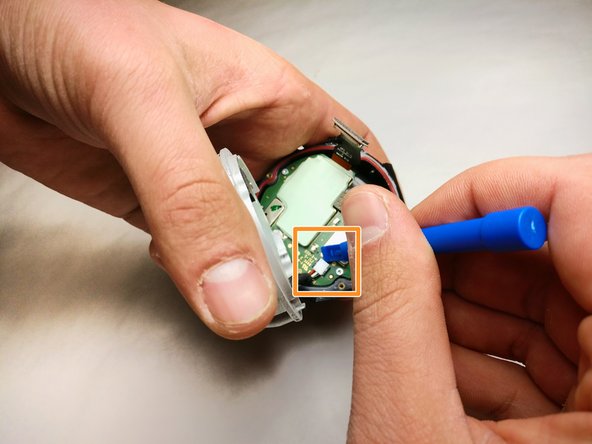
    • Gently pry the plug off the port on the circuit board with a plastic opening tool.

    • Remove the four 2 mm screws using a T4 screwdriver.

    • Remove the circuit board from the device.

    Vraag FixBot
  6. 360fly 4K Lens Replacement: stap 6, afbeelding 1 van 3 360fly 4K Lens Replacement: stap 6, afbeelding 2 van 3 360fly 4K Lens Replacement: stap 6, afbeelding 3 van 3
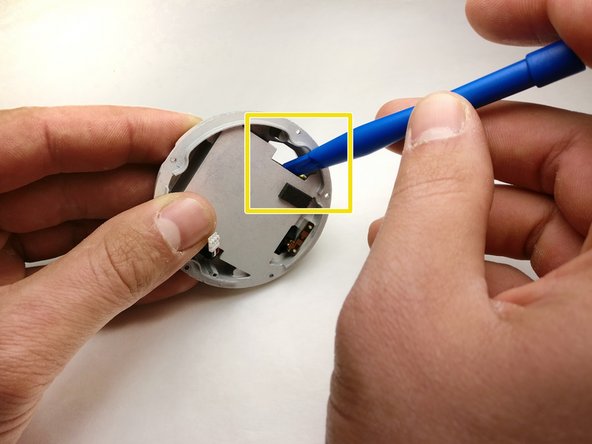
    • Remove the five 4 mm screws around the battery assembly with a T4 screwdriver.

    • Lift the battery assembly and gently pry the plug out of its port on the board below with a plastic opening tool.

    • Press the battery from the back of the battery assembly to remove it with a plastic opening tool until the glue releases the battery.

    • Potential for device damage: Do not puncture or bend the battery. Use a small amount of heat to assist in softening the adhesive if necessary.

    Vraag FixBot
  7. 360fly 4K Lens Replacement, SD Card: stap 7, afbeelding 1 van 1
    • Gently pry the plug from the motherboard and remove the motherboard from the assembly.

    Vraag FixBot
  8. 360fly 4K Lens Replacement: stap 8, afbeelding 1 van 1
    • Remove the three 3 mm screws from the circuit assembly with a T4 screwdriver.

    Vraag FixBot
  9. 360fly 4K Lens Replacement: stap 9, afbeelding 1 van 1
    • Gently pry out the plug from the circuit assembly.

    Vraag FixBot
  10. 360fly 4K Lens Replacement: stap 10, afbeelding 1 van 1
    • Press and release the SD card to remove it from the circuit assembly.

    Vraag FixBot
  11. 360fly 4K Lens Replacement, Lens: stap 11, afbeelding 1 van 1
    • Unscrew the five 3mm screws with a T4 screwdriver.

    Vraag FixBot
  12. 360fly 4K Lens Replacement: stap 12, afbeelding 1 van 1
    • Gently push against the lens module to remove it from the 360fly 4K assembly.

    Vraag FixBot
Conclusie

To reassemble your device, follow these instructions in reverse order.

Jacob Herron

Lid sinds: 11/08/17

463 Reputatie

3 handleidingen geschreven

Team

IUPUI, Team S5-G3, Baechle Fall 2017 Lid van IUPUI, Team S5-G3, Baechle Fall 2017

IUPUI-BAECHLE-F17S5G3

3 Leden

3 handleidingen geschreven

4Gids Commentaar

Hi. Where to get a replacement lens as I am in need for this repair, but 360fly offer a full service for $150 and do not sell spare lenses. Thx

anguel nakov - Antwoord Deel

There is no info where to buy the replacement lens.

gelo3000 - Antwoord Deel

Anyone know about usb pinout? I lost my charger adapter

Nuri Can PEHLİVAN - Antwoord Deel

Hi.

I inadvertently found your question.

I have this same problem.

I've lost the charger, too, and now I'm looking for a chance to charge without a base, or a chance to buy a base.

Imants

Imants R - Antwoord Deel

Voeg opmerking toe

Weergavestatistieken:

Afgelopen 24 uren: 2

Afgelopen 7 dagen: 10

Afgelopen 30 dagen: 61

Altijd: 2,265