Ga door naar hoofdinhoud
Sluit je aan bij de reparatiegemeenschap! Maak een account aan

De meest geavanceerde robotstofzuiger van Ecovacs. Bij beide versies draait het hele ontwerp om een sensor of camera vooraan de robot om veelvoorkomende huishoudelijke voorwerpen zoals sokken, kabels, vreemde stoelpoten, enz. te vermijden. De robot heeft de optie om zichzelf te legen met een zelflegend reservoir (apart verkrijgbaar).

Deebot is charging but battery level didn't increase

I had a problem with my Deebot. First the battery level stayed at 60%, it is charging (the app told me it is charging and the button is flashing). but the battery level didn't increase. After using the bot to clean the floor the level is 10%. Again it keeps loading but the battery level didn't increase.
So i replaced the battery with a new one. This one was charged 70% from factory but now i see the same thing happen, it is charging now for a few hours but the level still is 70%.
Does anyone know this issue? I hope someone can help me!

Beantwoord deze vraag Dit probleem heb ik ook

Is dit een goede vraag?

Score 1
1 Opmerking

With average robot vacuums lasting around 5 years, perhaps emailing or calling ecovacs for technical support may help answer your question(s); https://www.ecovacs.com/us/about-ecovacs

door Deel

Voeg een opmerking toe

7 Antwoorden

Filteren op:
Het nuttigste antwoord

If you replaced the battery, what I would try is cleaning the contacts with isopropyl alcohol on the bot and the charging station. Now if that doesn't work, I would try resetting the deebot. Only reason I mention a reset is because it could be a software issue causing charging issues because you already replaced the battery

FYI you will have to add the bot back to the app, as this resets everything on the bot itself

Reset Deebot T8

Was dit antwoord nuttig?

Score 2

1 Opmerking:

I have the same problem with my T5. Takes two days for it to charge from 72% to 100%. Does anyone know the values of the resistors and the diode that generally go bad?

Thank you!

door Deel

Voeg een opmerking toe

@Dennis Hendriks

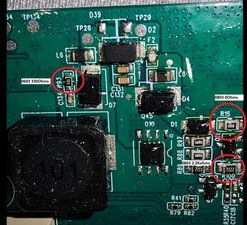
Hi Dennis, i had i simmilar problem with my Deebot 950, after some Mainboard probing i found out 3 dead resistors, on the 950 mainboard they are identified as R93 (0603 330 Ohms), R16 (0803 0Ohms) and R100 (0803 2.2Kohms), replaced them reassembled everything back, app showed me that battery was at 17% but still didn't charged, left it over night and next mornig it was at 100%.

Afbeelding

I'm still testing my "repairs" since all this was donne yesterday XD .

Hope it helps.

Cheers,

Was dit antwoord nuttig?

Score 2

9 opmerkingen:

Hi Luis,

Thank you for the info on your repair! Mine does charge but only drawing 100 miliamps from the base. When it arrives at the base it goes to 600 Miliamps for maybe 30 seconds and then goes to 100 and stays there till charged which takes at least 8 hours. I can’t let the battery charge percentage go under 80%. If I do, it will return to the charger and go in and come out many times. The only way to get it to stay in the charger is to pick it up and wait till it says “suspended “ then put it manually back down.

Please let me know if yours will charge from a low percentage and how long it takes after you do more testing.

Thanks!

Bill

door Deel

Hi Luis, how did you probe to find these dead resistors?

door Deel

@adamspiers Hi, I used a multimeter on resistance mode to probe all resistances near the charging input.

door Deel

@williamboehly Hi, mine still works fine after the replacement of the dead resistors, i haven't found out anything wrong with it nor any weird behavior like you described no matter the battery percentage, after a long vacuum session it normally finishes around 30ish % and charges back to 100 without an issue, however I never tested how long It took.

Cheers,

door Deel

Thank you very much Luis for the helpful info. I am not very experienced with electronics but I do have a multimeter and soldering equipment. How do you find out what resistance each resistor is supposed to have - is it based on the number on top? I'm also confused why R16 (0803) is 0Ohms, does that mean zero resistance or is it just a very small resistance in milliOhms? Thanks!

door Deel

4 commentaren meer tonen

Voeg een opmerking toe

That main board issue change main board your problem is solved.

Was dit antwoord nuttig?

Score 1

7 opmerkingen:

Although it is a possible solution, that is something that should be done last because you have a lot to take apart, then you wire back everything up again. I know this firsthand from roombas and groovi vaccums

door Deel

Thanks. is now collecting dust so i can try that. Do you know where i can buy a replacement main board?

door Deel

hello pls check the incoming diode from the plug (right side from the wlan module) i got the same problem and the diode and two resistors (2201) burned up (underside of the mentioned plug) changed it and it charges fine since then.

i know im a bit late to the party but maybe other who encounters the problem find a usefull fix in my discovery

door Deel

Hello. Good work! May I have more precisions. What are the ref of damaged components? Diode D5 ??? What are the Ref and value of the resistors?

door Deel

Dear Tomas,

It’s the charging dock the issue or the plug which it’s going into the wall ?

door Deel

2 commentaren meer tonen

Voeg een opmerking toe

The deebot was 2 weeks out of warranty and only lasted 8 minutes with full battery charging time. Sourced a new battery and replaced it. No change. Fully charged battery and only 8 minutes roughly before it announces low battery and returning to dock. I’ve pretty much serviced all moving parts so it’s not a load issue draining the battery. More likely some battery current or voltage level sensor malfunction. This also happened to a previous model that we had to replace. Anyone have a similar history?

Was dit antwoord nuttig?

Score 0

1 Opmerking:

having same issue. Charging dock tested and working. New battery testing at 12v.. Charging plates on robot reflect<1.0v so there is a fault between the robot charging plates and the battery. Not sure how to attack this. BESENDERS (the auth. service ctr for Ecovacs) won't touch until parts arrive from Ecovacs. Kinda hosed here I think.

door Deel

Voeg een opmerking toe

Just to add to the mystery, my 920 won't charge from it's dock, but it will charge from my T8 auto empty station. I measured the voltages and the T8 dock is a bit over 21 volts vs just under 20 volts on the 920 dock. It won't charge to 100% but it will consistently charge above 80%.

Was dit antwoord nuttig?

Score 0

1 Opmerking:

Hi Michael,

Does it charge rapidly to 100% using the T8 charger? And it only will charge slowly from above 80% using the 920 charger?

I had a similar problem with my T5 but would only charge slowly as long as the battery was over 80%. It could be a few bad resistors on the Mother board. I have not had the time to confirm this yet.

door Deel

Voeg een opmerking toe

I have a same problem, have you sort out the issue mate?

Was dit antwoord nuttig?

Score 0
Voeg een opmerking toe

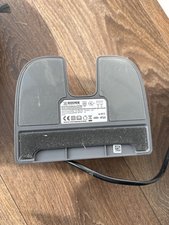
Afbeeldingsinhoud bekijken:

Afbeelding

Was dit antwoord nuttig?

Score -1

1 Opmerking:

Dear Tomas,

This was the issue ?

The charging dock ?

door Deel

Voeg een opmerking toe

Voeg je antwoord toe

Dennis Hendriks zal eeuwig dankbaar zijn.
Weergavestatistieken:

Afgelopen 24 uren: 4

Afgelopen 7 dagen: 32

Afgelopen 30 dagen: 91

Altijd: 5,548