
Ga door naar hoofdinhoud

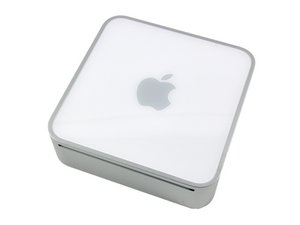
1.5 Core Solo, 1.66 or 1.83 Core Duo, or 1.83 or 2 GHz Core 2 Duo processor. This covers the first Intel-based Mac Mini models from Early 2006 to Mid 2007.

Why won't Mac Mini boot after installing SSD hard drive?

I just installed a 3rd gen Seagate ssd 1tb in my 2008 Mac mini a1176. It's not working.

I first mounted the new drive with a USB enclosure and formatted it then used carbon copy to clone my old hd.

After installing the ssd, the mini powers on lights, HD spinning but no ideo and no USB power for the keyboard! So I can't even boot with the lion disk in the optical!

Took it apart put the old hd back and it works fine.

Going to reformat the drive but not clone and see what happens.

Beantwoord deze vraag Dit probleem heb ik ook

Is dit een goede vraag?

Score 0
2 opmerkingen

Similar problem with a 2009 Mac Mini, upgrading with a Sandisk Ultra II SSD. It does Chime, but then bright grey screen, no logo, no option to choose startup disk, even with old boot drive conected by usb. Any ideas?

door

@Romeu Peitinho:

Your systems specs: Mac mini 2.66 GHz (Late 2009)

Your SSD's specs: Sandisk Ultra II

door

Voeg een opmerking toe

2 Antwoorden

Het nuttigste antwoord

@Romeu Peitinho - Sadly, you can't use a SanDisk Ultra II SSD in your system as it's a SATA III (6.0 Gb/s) drive and your system is only designed to support older SATA II (3.0 Gb/s) drives. You'll need to find a fixed SATA II drive or one that auto senses the systems SATA port like this drive: Samsung 850 EVO SSD. Note the Interface line.

Was dit antwoord nuttig?

Score 2

3 opmerkingen:

@danj - Thanks for your help. I was divided between the two until the last minute . Made the budget choice. (now have to buy both) :(

Do you know if a 2009 MacBook Pro would work with the Sandisk Ultra II (480GB)?

Having and externall SSD seems such a waste...

Again, thanks for your help.

door

The best way to figure out what your system has is to look it up here on EveryMac just plug in your systems S/N and then review the drive info. Thats what I did for your system (look under your Q above)

door

Thanks.

I did look up the hard drive specs for the Mini, but I (wrongly) assumed that SATA III drives where all "retro-compatible" whit SATA II.

Completely ignored that auto-sense feature in the EVO. There isn't a lot of info on the web about this. Even the Sandisk info page on SATA speeds and compatibility is pretty vague.

Guess I'm out of luck with the MacBook Pro as well...

http://www.everymac.com/systems/apple/ma...

door

Voeg een opmerking toe

hi

Were you able to hear a Chime sound after the installation of your new hard disk ?

Between if you have installed a SSD then you cant hear the HD spinning as in SSD there is nothing that spins, it just has chips in that.

Was dit antwoord nuttig?

Score 0
Voeg een opmerking toe

Voeg je antwoord toe

Sean Roark zal eeuwig dankbaar zijn.
Weergavestatistieken:

Afgelopen 24 uren: 1

Afgelopen 7 dagen: 3

Afgelopen 30 dagen: 13

Altijd: 1,784

